
In busy schools, hospitals, and large facilities, even a few seconds of drift between clocks can create late class starts, missed handoffs, and avoidable delays. Staff scramble to track down the right time, while facilities teams lose hours walking the building just to reset clocks after power outages or seasonal time changes.
Primex Sync Wi-Fi clocks eliminate these frustrations by synchronizing time facilitywide through your existing Wi-Fi network so every hallway, patient room, office, or lab is operating from the same trusted time source. Automated daylight saving time adjustments, Network Time Protocol (NTP) accuracy, and cloud visibility means your team can stop chasing clocks and focus on students, patients, and events.
Primex Sync Wi-Fi: How It Works
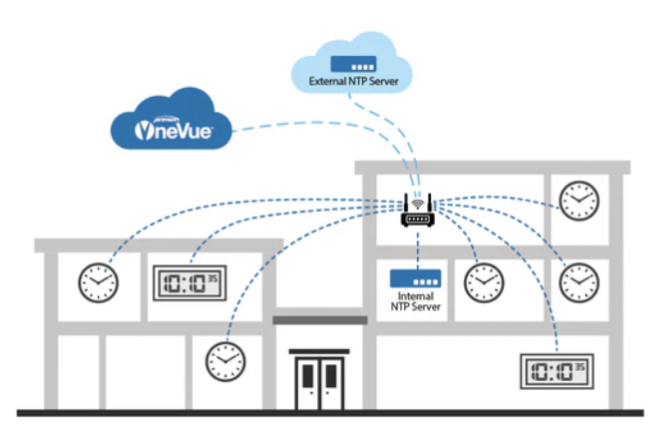
Primex Sync Wi-Fi clocks leverage your existing IT network to acquire time from an NTP server and use your existing Wi-Fi network to deliver sub-second accuracy to each clock. Using the latest Wi-Fi standards and TLS 1.3 encryption, Primex Sync clocks support secure deployments across school campuses, hospitals, and manufacturing facilities. Primex Sync clocks come preconfigured with your network information, so every clock is prepared to receive time out of the box.
Once connected, clocks automatically synchronize, adjust for daylight saving time, and can be monitored alongside other Primex solutions through the cloud-based OneVue® software platform. This proven wireless synchronized solution scales from a single building to a multisite organization, giving you flexibility in clock placement and future expansion.
Digital and Analog Wi-Fi Options
Primex Sync Wi-Fi clocks are available in both easy-to-read digital formats and versatile analog styles to fit any environment. From patient corridors to school classrooms, hallways, and office lobbies, you can mix and match digital and analog clocks throughout your facility while maintaining the same precise, synchronized time everywhere.
Multiple Technologies, One Trusted Partner
If your facility requires a different technology, Primex Sync also provides synchronized time through our patented Radio 72 MHz, Bluetooth® Low Energy, and Power over Ethernet options, all designed to deliver the same synchronized time experience. Our knowledgeable team will assist in creating a tailored solution for your facility’s needs.
Sitewide Synchronized Time Made Simple
Eliminate clock drift, manual resets, and seasonal changeover headaches. With a wide range of available clocks, automatic daylight saving time changes, and built-in expandability, your teams gain a consistent, trusted time reference in every space. Connect with a Primex specialist today to discuss your Wi-Fi clock needs and build a synchronized time solution that keeps your entire organization running on time.
Frequently Asked Questions
Are Primex Sync Wi-Fi clocks difficult to configure?
Primex Sync Wi-Fi clocks are designed for a streamlined setup process that connects them to your existing network without requiring complicated configuration. Your solution is preconfigured before shipping to reduce installation complexity. Once connected, clocks automatically synchronize, appear in OneVue® for cloud management, and retain synchronized, accurate time.
Does Primex Sync Wi-Fi use a master clock?
Primex Sync Wi-Fi does not use a master clock. Instead, the Primex Sync Wi-Fi solution leverages your existing network to acquire highly accurate NTP time. With each clock able to acquire its own time, Primex Sync Wi-Fi avoids the single point of failure present in master clock systems.
How are Primex Sync Wi-Fi clocks powered?
Power options for Primex Sync Wi-Fi clocks include batteries, 120V AC plugs, 120V Molex connectors, or 240V connectors.
-
“Our hospital campus is large, but the Primex clocks were still a breeze to install, especially since hardwiring wasn’t required”
Ray Bressler, Master ElectricianBeloit Memorial Hospital