
No two school days are ever exactly alike. From class schedule changes, office days, and assemblies to unforeseen alterations or cancellations, school leaders must be ready to change plans on a dime. Being prepared means having a strong school bell system or network bell controller to alert students to changing periods. Working alongside a Primex Sync™ Synchronized Time solution, Primex Notify Bell Controllers easily integrate into existing public address systems to trigger standard or custom ring patterns based on your school’s specific needs.
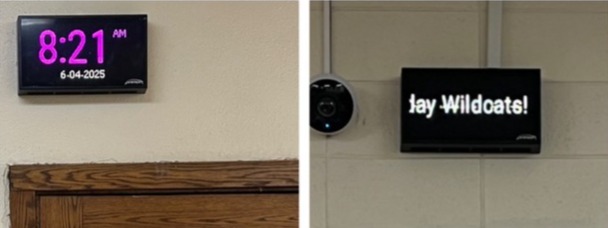
Of course, when schedules change or classes end, students need to be informed. Supplement the Primex Notify programmable Bell Controllers with Primex Notify InfoBoard™ Displays, which can operate as countdown timers in between class periods. When posted in hallways, the easy-to-see digital display boards let students know just how much time they have before their next class starts. These bright LED boards can also convey critical notifications at the press of a button or customized messages, further informing students of all happenings.
Together, Primex Notify Bell Controllers and InfoBoard Displays as countdown timers can take your school's schedule planning and timeliness to the next level.
-
Simplify Bell Scheduling: Set yearlong bell schedules for one or every school in your district from the OneVue® web-based software platform.
-
Manage Unplanned Schedule Changes: Easily and quickly edit bell schedules when necessary for weather-related late starts, pep rallies, or in case of emergency.
- Maximize Learning Time: Countdown timers help to reduce tardiness, hallway logjams, and late-student distractions so teachers can maximize instructional time.
- Better Inform Students: Digital message boards reach deaf or hard of hearing individuals and can communicate to students in loud areas - band rooms, cafeterias, gymnasiums - where audio announcements often go unheard.
- Strengthen Schoolwide Communication: Create custom messages within the OneVue platform to acknowledge special achievements, bolster announcement reach, or boost school spirit.
When looking for a dependable school bell controller with PA integration, choose the Primex Notify Bell Controller with calendar scheduling for a fully optimized schoolwide bell system. Combine this updated bell controller with Countdown Timers to further take your campus to the next level. Fill out the form below to speak with a dedicated Primex Sync team member to discuss your school’s unique case today.
Frequently Asked Questions
Is the Primex Notify Bell Controller a wireless bell controller?
The Primex Notify Bell Controller is powered by either a 5V wall adapter or Power over Ethernet cable. It connects wirelessly to the cloud-based OneVue Software platform, where daily, weekly, and annual schedules can be set.
Can I use the Primex Notify Bell Controller as a retrofit bell controller?
The Primex Notify Bell Controller is an easy-to-install device that can fit into your existing wired network using Power over Ethernet.
Does the Primex Notify Bell Controller Integrate with my PA System?
Yes, the Primex Notify Bell Controller seamlessly integrates with most PA systems, making it the perfect replacement bell controller.
What are the benefits of a Primex Notify InfoBoard?
Primex Notify InfoBoard Displays can operate as a countdown timer, letting students know exactly how much time remains between class periods to reduce tardiness and improve time management. These critical mass notification solutions also deliver text-based announcements for emergencies and customized messages where audio announcements usually go unheard.
-
"One night, a colleague went into the [OneVue] software, changed the colors of the date and time, and added ‘Have a Great Day Wildcats!’ We wanted to see how long it would take for anyone to notice. It caused quite the stir the very next morning."
Phill Klamm, District AdministratorWalworth Jt. School District #1